
Stop looking for the one AI coding tool that wins.
It's the question every indie builder asks — "which AI IDE should I use?" — and it's the wrong starting point. The AI IDE wars didn't produce a winner. A story from The New Stack published two days ago (April 13, 2026) explains why: developers aren't picking one tool. They're stitching three together into a three-layer stack.
This post is a practical guide to that stack — what each layer does, what the tooling costs, and how to start building your own workflow today.
The Three-Layer Stack: What It Actually Looks Like
The "stack" isn't a product. It's an emergent pattern from how developers are actually working in 2026:
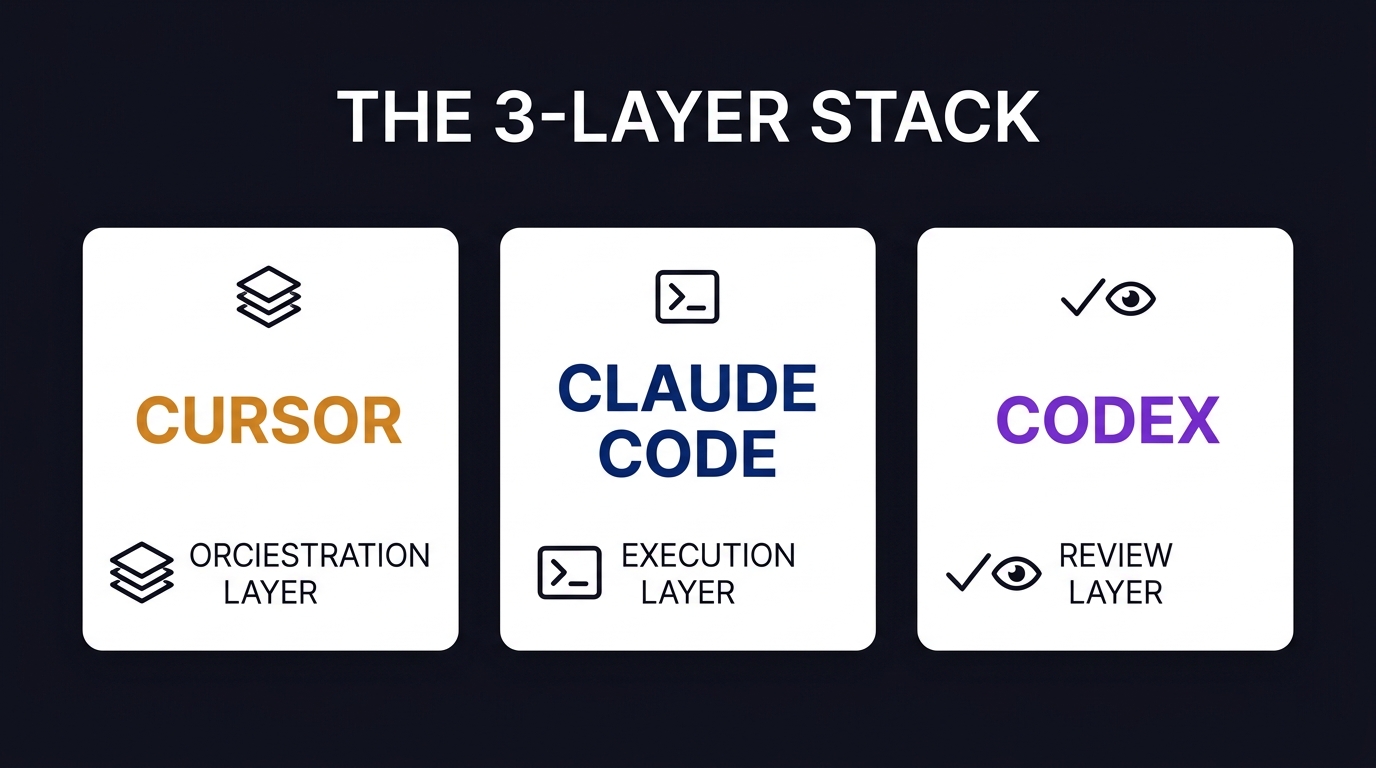
Orchestration layer — Cursor
Cursor is the visual hub. Cursor 3 (April 2, 2026) introduced the Agents Window — the most significant interface change since Cursor launched. You can run multiple AI agents in parallel across repos, worktrees, cloud environments, and SSH connections. Cursor 3.1 (April 13) added split-pane multi-agent monitoring: run several agents simultaneously, see what each one is doing in real time.
This is the orchestration layer. Cursor handles the "what are we doing, and where are we in it" view. It's visual, it's multi-agent, and it's where the coordination happens.
Execution layer — Claude Code
Claude Code runs in your terminal. No GUI. No context switch. Give it a goal and it works toward it — deep reasoning, task completion, debugging, feature implementation. It's strong on the tasks where focus matters more than visual feedback.
For solo founders who live in the CLI, Claude Code adds AI execution without adding interface overhead. You already have a terminal window open. Use it.
Review layer — Codex
Codex is GitHub-native. It handles inline pull request review, CI pipeline analysis, and automated code feedback where developers already work — inside GitHub itself. The review layer is the most overlooked piece of the stack: automated, consistent, never tired.
Solo founders often skip code review because it feels like overhead. Codex makes it frictionless.
The Key Difference: Cognitive Mode, Not Feature Set
The three layers aren't just different tools — they're different cognitive modes:
- Orchestration requires broad visibility: knowing what's happening across multiple tasks simultaneously, with the ability to redirect, pause, or escalate each agent independently. This is visual work. Cursor's Agents Window is purpose-built for it.
- Execution requires deep focus: sustained attention on one problem without interface distractions. This is terminal work. Claude Code is designed for it.
- Review requires consistent checking: applying the same standards reliably, without the fatigue or blind spots that come from reviewing your own code after a long session. This is automated work. Codex is built for it.
The reason no single tool does all three well is that the cognitive requirements conflict. A tool designed for broad visual orchestration is the wrong interface for deep focused execution. The stack isn't a compromise — it's the correct structure.
Cursor 3.1 and the Parallel Agent Shift
Cursor 3.1 shipped April 13 — the same day as The New Stack published its story. The headline feature is split-pane multi-agent monitoring: you can run several agents simultaneously in the same window and see what each one is doing, independently.
For indie builders running a monorepo or multiple projects, this changes what concurrent development looks like. Three features being built in parallel, each agent reporting back to the same window, with per-agent progress visibility.
Cursor 3 (April 2) had introduced the Agents Window itself — the biggest interface overhaul since launch. Cursor 3.1 completing the picture: orchestration is now a first-class, visual, real-time workflow in Cursor, not an afterthought.
How to Build the Stack Today
You don't need all three tools to start. Pick the layer where your current workflow has the most friction:
If you're managing multiple features or projects simultaneously: Start with Cursor Pro ($20 per month). The Agents Window is where the multi-agent shift pays off. Run agents on three concurrent tasks and watch them work in parallel. If you're still using Cursor as a smart autocomplete tool, you're missing 80% of what the Agents Window offers. The Pro plan is where the orchestration features live.
If you're stuck in long debugging sessions or slow feature builds: Add Claude Code. Terminal-native, no interface overhead. Give it a defined task — a specific refactor, a bug fix, a feature implementation — and it works through it without requiring you to open a separate window. Pay per use via the Anthropic API: start with a small budget, scale as you see results.
If you skip code review because it feels like overhead: Enable Codex on your GitHub repos. It's free, it's automatic, and it catches the things a tired solo founder misses after a long debugging session. Set it up on your pull requests and let it run in the background.
The stack builds from your current friction point. Start there.
Pricing Overview: What the Stack Costs
| Tool | Cost | Layer |
|---|---|---|
| Cursor | Free or $20 per month Pro | Orchestration |
| GitHub Copilot | $10 per month | Execution (lightweight alternative) |
| Claude Code | API-based (pay per use) | Execution (deep reasoning) |
| Codex | Free via GitHub | Review |
The stack doesn't require a large budget. Cursor Pro is the most significant line item at $20 per month. Copilot at $10 per month is a capable execution-layer alternative if you want AI autocomplete without the agent complexity. Claude Code runs on API pricing — pay for what you use.
35% of Cursor's own merged pull requests are produced using AI-assisted workflows, per Cursor's own data cited in recent analysis. The Agents Window in Cursor 3 is the feature that makes this kind of workflow accessible to solo founders.
What Cursor 3.1 Actually Changes in Practice
The practical shift from Cursor 3.1's split-pane multi-agent view isn't abstract. Here's what it looks like day-to-day:
Instead of switching between projects manually, you open three agents in parallel — one on your frontend refactor, one on your API endpoint, one writing tests. Cursor shows you each agent's progress, the files it's modifying, the decisions it's making. You redirect the ones that drift. You let the ones that are working continue.
For solo founders who run multiple concurrent projects, or who are building a feature that spans frontend, backend, and infrastructure simultaneously, this changes the shape of the working day. You're no longer context-switching between tasks. You're supervising a parallel process.
This isn't science fiction. Cursor 3.1 shipped it yesterday. The feature is live.
Why the AI IDE Wars Didn't Produce a Winner
The AI coding tool market has structurally resisted consolidation. Not because the products are equally good — but because the problem itself has layers.
Orchestration, execution, and review are different cognitive tasks. Different interfaces serve those tasks better. No single tool has solved all three, because they require genuinely different designs.
The stack is the correct answer. Use the right tool for the right layer, and stop looking for the one that wins everything.
Try Cursor Pro if you're on the free tier and running more than one project. The Agents Window is where the leverage is for solo builders — and $20 per month for multi-agent orchestration across multiple projects is cheaper than the time you're currently wasting context-switching.
Build the stack. Not the winner.